
JA-180P
Service explanation for JA-180P
Wireless PIR
This product is a part of the Jablotron 100 series alarm system. It serves for spatial detection of movement of persons within buildings. Detection characteristics of it can be changed by using an alternative lens. Immunity against false alarms is optional at two levels. The detector communicates via the Jablotron wireless protocol and is powered from a battery.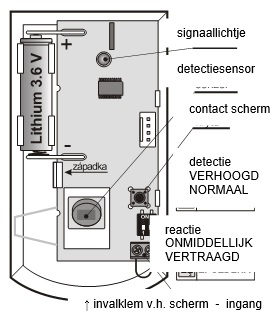
Installation
The detector must be installed by a trained technician with valid Jablotron certification. The detector can be installed on a wall or in a corner of the room. In its field of vision, there should be no objects that change temperature rapidly (electric heaters, gas appliances, etc.), no objects with temperature approaching human body temperature that move (e.g. wavy curtains over a radiator) and no pets. It is not recommended to install the detector opposite windows or reflectors, also not in places, where the air flows (ventilation, draft holes, non-closing doors, and the like).
In front of the detector, there should be no obstructions that obstruct its view, and it should not be installed near metal objects (they shadow the radio communication)
1. Open the detector screen (by pressing the snap clip) - do not touch the PIR sensor inside or damage the antenna above the signal light
2. Take out the electronics panel - it is held inside by a snap clip
3. Push through the holes for screws in the plastic back panel (at least one screw must be located in the segment for detection of disengaging assembly)
4. Screw down the plastic back panel, about 2.5 m above the floor (vertically, with the drop-in clamp of the screen down)
5. Replace the electronics (with the sensor facing the collapsing clamp of the screen)
6. Leave the battery disconnected and the screen open. Continue according to the installation manual of the central unit (receiver). Basic steps:
a. Switch the central controller to service and use the 1 key to enter learning mode
b. Connect the battery in the detector - with this it learns
c. End learning mode with the # key
In order to comply with the CSN-EN 50131-2-2 standard, the drop-in terminal of the screen must be locked by the screw provided.
If you learn the detector in the receiver after the battery has already been connected, as first disconnect it, then press and release the screen contact several times (the residual energy is used up) and only then run the learning mode.
After connecting the battery, the detector needs approx. 2 minutes for stabilization. The light remains on for that time.
Setting switches
Switch 1: determines the degree of immunity against false alarms. Position OFF combines good immunity with fast response. Position ON increases the immunity of the sensor at the expense of speed (to be used in problematic installations).
Note: the most common cause of unwanted activation is improper detector placement.
Switch 2: DEL / INS determines whether the detector is located on the access road to the house and grants an exit and entry delay = position OFF,. In the ON position, the detector invokes an immediate response from the armed control center. The switch is only significant when used with the Jablotron central unit with response NATUR set. If a different response is set in the detector's central unit, or you are using the detector with a JA-182N or JA-180N receiver, the pass-through no meaning.
On opening the screen, the detector always reacts with a sabotage signal.
Detector testing
For 15 minutes after closing the screen, the detector indicates activation via the signal light. In service mode, the control center can check the detector signal, including measuring its quality.
Select sensor sleep time
minutes / 1 minute
In order to save battery power, the detector enters power save mode 15 minutes after the screen is closed. When motion is detected, it informs the control center and for the next 5 minutes does not respond to motion (sensor sleeps). After this period, the sensor wakes up and goes into continuous wake-up mode until the next movement in the room, etc.
The sensor's sleep time can be shortened to 1 minute by holding down the contact switch on the screen when connecting the battery (if you connect the battery without pressing the contact switch, the sleep time is set to 5 minutes).
Replace battery in the detector
The product monitors the state of the battery and as soon as it begins to run low, it informs the user (possibly also the service). The detector continues to work and also indicates movement with a short flash of the signal light. We recommend replacing the battery within 2 weeks. The battery is replaced by the technician in service mode. After replacing the battery, the sensor needs approx. 60s for stabilization - the signal light remains on. After the light goes out, test the detector operation.
If a weak battery is inserted in the detector, its signal light will flash for approx. 1 min. After that, the detector will work, but will report a depleted battery
Do not dispose of a spent battery in the household waste, dispose of it with chemical waste.
Remove detector from the system
The system reports a possible loss of the detector. If you intentionally disassemble the detector, you must also delete it in the control center.
Detection characteristics
From the factory, the detector is equipped with a 120°/12m lens. The area is covered by 3 fans (curtain fields) - see the following figure.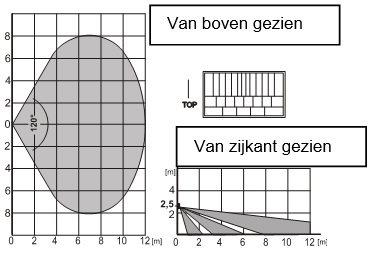
Characteristics can be changed by using an alternative lens:
JS-7904 is intended for long corridors, the middle curtain field extends up to 20m
JS-7906 has only the upper curtain field of 120°/12m and does not cover the floor (can eliminate the movement of small animals across the floor)
JS-7901 makes a vertical curtain field - does not cover the surface, but creates a detection wall (a barrier can be defined, where any violation of it is reported)
Note: after replacing the lens, check, whether the detector covers the area properly (an incorrectly installed lens can cause a detection error).
Auxiliary input for wires
This input can be used, for example, for a magnetic door/window detector. Activation (opening of the terminals) has the same effect as movement for the detector.
The line connected to the terminals should be max. 3m long, it is recommended to use shielded cable. If the input is not used, the terminals must be jumpered.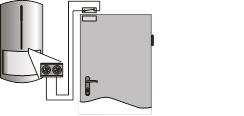
Technical parameters
Power supply Lithium battery type LS(T)14500 (3.6V AA / 2.4Ah)
Typical battery life approx. 3 years (sensor sleeps 5min.)
Communication band 868.1 MHz, protocol Jablotron
Communication range approx. 300m (direct visibility)
Recommended installation height 2.5 m above floor
Detection angle/length recording 120° / 12 m (with base lens)
Environment in accordance with EN 50131-1 II. indoors, general
Operating temperature range -10 to +40 °C
Dimensions, weight 110 x 60 x 55 mm, 100g
Classification according to EN 50131-1, EN 50131-2-2,
CSN EN 50131-5-3 grade 2
Further complies with ETSI EN 300220, CSN EN 50130-4,
EN 55022, EN 60950-1
The detector is designed and manufactured in accordance with the provisions to be applied thereto: Government Decree No. 426/2000 Sb., in the text of subsequently promulgated regulations, if used according to its intended use.
Note: Although this product does not contain harmful materials, do not dispose of it in the domestic waste, but dispose of it at the collection point intended for electronic waste.